 PROMPT TO PRODUCTION
Chapter 10: Test-Driven Development with AI
Quick Start (5-10 minutes)
Test-Driven Development means writing tests before writing code. With Claude Code, this becomes fast and natural: you describe what a function should do, Claude generates tests, then Claude implements the function to pass those tests. The result is code that works correctly from the start.
Here is the complete cycle in five minutes.
Step 1 – RED: Write a failing test.
You: I need a function called validatePassword that checks:
     - At least 8 characters
     - Contains a number
     - Contains an uppercase letter
     Write the test file first. Don't implement the function yet.
Claude generates:
// src/utils/password.test.js
const { validatePassword } = require('./password');

describe('validatePassword', () => {
  test('rejects passwords shorter than 8 characters', () => {
    expect(validatePassword('Ab1')).toBe(false);
  });

  test('rejects passwords without a number', () => {
    expect(validatePassword('Abcdefgh')).toBe(false);
  });

  test('rejects passwords without an uppercase letter', () => {
    expect(validatePassword('abcdefg1')).toBe(false);
  });

  test('accepts valid passwords', () => {
    expect(validatePassword('Abcdefg1')).toBe(true);
  });

  test('rejects empty string', () => {
    expect(validatePassword('')).toBe(false);
  });
});
Run the tests – they all fail. That is expected and correct.
Step 2 – GREEN: Make the tests pass.
You: Now implement validatePassword to pass all these tests.Claude generates:
// src/utils/password.js
function validatePassword(password) {
  if (typeof password !== 'string') return false;
  if (password.length < 8) return false;
  if (!/[0-9]/.test(password)) return false;
  if (!/[A-Z]/.test(password)) return false;
  return true;
}

module.exports = { validatePassword };
Run the tests – they all pass.
Step 3 – REFACTOR: Improve while tests keep passing.
You: Add input validation for non-string types, then verify tests still pass.Claude updates the function, runs the tests, confirms they pass.
That is TDD with AI. Tests define correctness. Code satisfies the tests. Refactoring is safe because tests catch regressions.
Try This Now: Open Claude Code and try this exact exercise with
validatePassword. Watch the Red-Green-Refactor cycle happen in real time. Then try it with your own function – pick something small from your project.
Core Concepts (15-20 minutes reading)
Why TDD Matters with AI
AI can generate code quickly, but how do you know that code is correct? Tests are the answer. Without tests, you are trusting AI output on faith. With TDD, you define what “correct” means first, then let AI produce code that demonstrably meets your specification.
The Red-Green-Refactor cycle:
RED:      Write a failing test that defines desired behavior
   ↓
GREEN:    Write the minimum code to make the test pass
   ↓
REFACTOR: Improve the code while keeping all tests green
   ↓
[Repeat for the next behavior]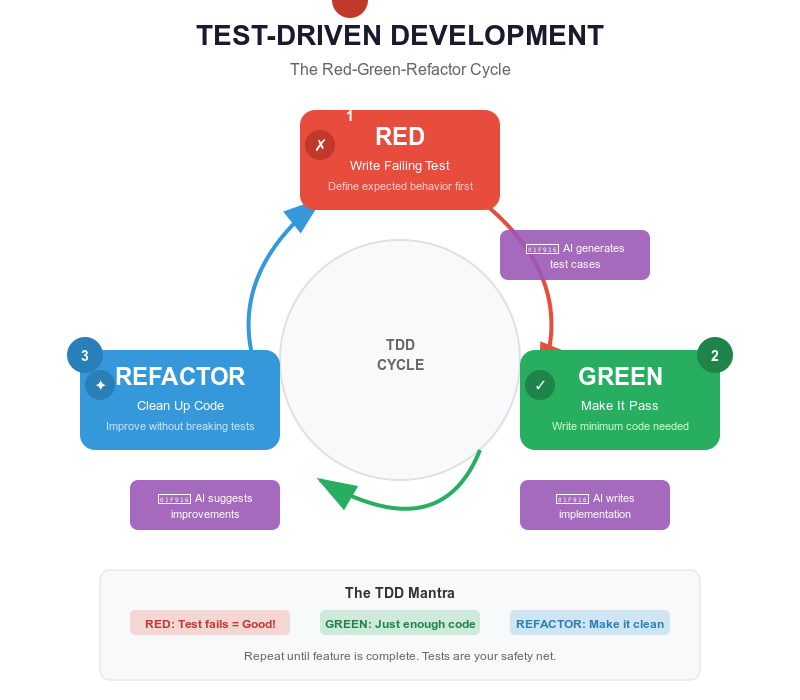
This cycle works especially well with AI because the two slowest parts of manual TDD – writing comprehensive tests and implementing code to pass them – are exactly what AI excels at.
The AI-TDD Workflow
Here is how a real feature development looks with Claude Code:
1. Define requirements clearly.
You: I need a function calculateCartTotal that:
     - Accepts an array of items with price and quantity
     - Applies a discount percentage if provided
     - Applies tax after discount
     - Returns the final total
     - Throws on invalid input
2. Claude generates comprehensive tests.
describe('calculateCartTotal', () => {
  test('calculates total for single item', () => {
    const items = [{ price: 10, quantity: 2 }];
    expect(calculateCartTotal(items)).toBe(20);
  });

  test('calculates total for multiple items', () => {
    const items = [
      { price: 10, quantity: 2 },
      { price: 5, quantity: 3 }
    ];
    expect(calculateCartTotal(items)).toBe(35);
  });

  test('applies discount before tax', () => {
    const items = [{ price: 100, quantity: 1 }];
    // 100 - 10% = 90, then 90 + 8% tax = 97.20
    expect(calculateCartTotal(items, 0.1, 0.08)).toBe(97.2);
  });

  test('handles empty cart', () => {
    expect(calculateCartTotal([])).toBe(0);
  });

  test('throws on invalid input', () => {
    expect(() => calculateCartTotal(null)).toThrow();
  });
});
3. Tests fail (RED). Expected – there is no implementation yet.
4. Claude implements the function (GREEN).
function calculateCartTotal(items, discount = 0, tax = 0) {
  if (!Array.isArray(items)) {
    throw new Error('Items must be an array');
  }

  const subtotal = items.reduce(
    (total, item) => total + item.price * item.quantity, 0
  );

  const afterDiscount = subtotal * (1 - discount);
  return afterDiscount * (1 + tax);
}
5. All tests pass (GREEN). You have a working, tested function.
6. Review and refine. Notice the tests did not cover negative prices? Ask Claude to add that test case and update the implementation.
Types of Tests
Unit tests verify individual functions in isolation. They are fast, focused, and form the foundation of your test suite.
You: Create unit tests for the email validation function in src/utils/validator.jsClaude generates tests for valid formats, invalid formats, and edge cases (null, undefined, empty string, non-string input).
Integration tests verify that multiple components work together correctly. They test real workflows like “user submits registration form, data is validated, user is created in database, welcome email is sent.”
You: Create integration tests for user registration that covers
     validation, database creation, and email sending.
     Mock the database and email service.
Claude generates tests with mocked dependencies that verify the full flow, including error scenarios like duplicate emails and database failures.
End-to-end tests verify complete user workflows through the entire application using tools like Playwright. They are the most realistic but also the slowest and most fragile.
The testing pyramid applies: many unit tests, fewer integration tests, even fewer E2E tests.
What Makes a Good Test
Good tests follow the AAA pattern – Arrange, Act, Assert:
test('calculateDiscount applies 20% for premium users', () => {
  // ARRANGE: Set up test data
  const user = { type: 'premium' };
  const price = 100;

  // ACT: Execute the function
  const result = calculateDiscount(price, user);

  // ASSERT: Verify the outcome
  expect(result).toBe(80);
});
Good tests have descriptive names. The name should explain what behavior is being tested:
// Bad
test('test 1', () => { ... });

// Good
test('rejects registration when email is already taken', () => { ... });
Good tests verify behavior, not implementation. Test what the function does, not how it does it:
// Bad: testing implementation details
test('calls stripe.charges.create', () => {
  processPayment(100);
  expect(stripe.charges.create).toHaveBeenCalled();
});

// Good: testing behavior
test('returns confirmation number after successful payment', () => {
  const result = processPayment(100);
  expect(result.success).toBe(true);
  expect(result.confirmationNumber).toBeDefined();
});
Test Coverage: The Right Balance
Coverage is a metric, not a goal. Aim for 80-90% coverage on critical paths rather than 100% everywhere.
High priority (must test): Business logic, authentication, data validation, API endpoints, error handling, edge cases.
Medium priority (should test): Utility functions, data transformations, UI component logic.
Low priority (optional): Simple getters/setters, pass-through functions, constants, third-party library wrappers.
Try This Now: Pick a small function in your project that lacks tests. Tell Claude Code: “Write comprehensive tests for [function name] in [file path], then run them.” See what Claude catches that you might have missed.
How to Ask Claude Code to Write Tests
The quality of AI-generated tests depends on how well you describe your requirements. Here are effective prompts:
Basic:
"Write tests for the calculateTotal function"

Better:
"Write tests for calculateTotal in src/utils/cart.js using Jest.
 Test: single item, multiple items, discounts, tax, empty cart,
 invalid input. Follow the AAA pattern. Use our existing test
 style from src/utils/validator.test.js as a reference."
Providing an existing test file as a reference ensures Claude matches your project’s testing conventions, import style, and file structure.
Deep Dive (optional)
Test-Driven Refactoring
Tests are a safety net that makes refactoring fearless. Here is the workflow:
1. Verify all existing tests pass
2. Refactor the code (improve structure, readability, performance)
3. Run tests again
4. If tests pass → refactoring is safe
5. If tests fail → refactoring broke something, revert and try again
Example:
// Before: messy but working (tests pass)
function processOrder(order) {
  if (!order || !order.items || order.items.length === 0) {
    throw new Error('Invalid order');
  }
  let total = 0;
  for (let i = 0; i < order.items.length; i++) {
    total += order.items[i].price * order.items[i].quantity;
  }
  if (order.discount) {
    total = total - (total * order.discount);
  }
  if (order.tax) {
    total = total + (total * order.tax);
  }
  return { total: Math.round(total * 100) / 100 };
}
Ask Claude to refactor while keeping tests green:
// After: clean, decomposed, still passing all tests
function processOrder(order) {
  validateOrder(order);
  const subtotal = calculateSubtotal(order.items);
  const afterDiscount = applyDiscount(subtotal, order.discount);
  const finalTotal = applyTax(afterDiscount, order.tax);
  return { total: roundToTwoDecimals(finalTotal) };
}
Each helper function has a single responsibility, the logic is clear, and the tests confirm nothing broke.
Debugging Failing Tests
Four common failure patterns and their fixes:
Pattern 1: Wrong expectation.
expect(average([1, 2, 3])).toBe(2.5);
// FAIL: Expected 2.5, got 2
// Fix: The function returns integer division. Correct the expectation
// or fix the implementation.
Pattern 2: Missing async/await.
test('fetches user', () => {
  const user = fetchUser(1); // Returns Promise, not user
  expect(user.name).toBe('John'); // Fails
});
// Fix: Add async/await
test('fetches user', async () => {
  const user = await fetchUser(1);
  expect(user.name).toBe('John');
});
Pattern 3: State contamination between tests.
let counter = 0;
test('first test', () => { counter++; expect(counter).toBe(1); }); // PASS
test('second test', () => { expect(counter).toBe(0); }); // FAIL: counter is 1
// Fix: Reset state in beforeEach
beforeEach(() => { counter = 0; });
Pattern 4: Mock not working.
// Mock must be declared before imports
jest.mock('./api'); // This must come first
import { getUser } from './user';
import * as api from './api';
When a test fails and you cannot figure out why, paste the error into Claude Code:
You: This test is failing and I don't understand why:
     [paste test code and error message]
Claude will read the implementation, identify the mismatch, and suggest a fix.
Mocking Dependencies
Unit tests should test functions in isolation. When a function calls a database or external API, mock those dependencies:
jest.mock('./database');
import { db } from './database';

test('creates user in database', async () => {
  db.users.create.mockResolvedValue({ id: 1, name: 'John' });

  const result = await createUser({ name: 'John' });

  expect(result.name).toBe('John');
  expect(db.users.create).toHaveBeenCalledWith({ name: 'John' });
});
Key mocking rules:
jest.mock()declarations go before imports- Use
jest.clearAllMocks()inbeforeEachto reset state - Use
jest.spyOn()when you want to mock one method but keep others real - Mock at the boundary (database, network, file system), not internal functions
When Things Go Wrong
Problem: Tests pass but test the wrong thing.
This happens when AI generates tests that simply assert the current implementation rather than the intended behavior. The tests “pass” but do not actually verify correctness.
Signs: Tests have vague names like “test 1,” assertions check trivial
things like toBeTruthy(), or tests mirror the
implementation logic exactly.
Fix: Review every AI-generated test and ask: “If the implementation were wrong, would this test catch it?” Rewrite tests that would not catch real bugs. Test behavior (“returns error for invalid email”), not implementation (“calls regex.test”).
Problem: AI writes tests that just assert the implementation.
Claude sometimes reads existing code and writes tests that pass by definition because they test what the code does rather than what it should do.
// Bad: This test just mirrors the implementation
test('returns length * width', () => {
  expect(calculateArea(3, 4)).toBe(12); // What if the formula is wrong?
});

// Better: This test verifies known correct values
test('calculates area of 3x4 rectangle as 12 square units', () => {
  expect(calculateArea(3, 4)).toBe(12);
});
test('calculates area of unit square as 1', () => {
  expect(calculateArea(1, 1)).toBe(1);
});
test('returns 0 when either dimension is 0', () => {
  expect(calculateArea(0, 5)).toBe(0);
});
Fix: Write tests before the implementation exists, not after. When tests come first, they define the specification rather than mirroring existing code. If Claude has already seen the implementation, explicitly say: “Write tests based on the requirements, not the current implementation.”
Problem: Flaky tests (randomly pass or fail).
Causes: race conditions in async code, tests sharing state, dependency on execution order, external dependencies (network, system time), or unseeded random data.
Fix: Always use async/await properly. Reset state in
beforeEach. Use test.only to isolate the flaky
test. Mock external dependencies. Seed random data generators. Run
npm test -- --runInBand to test serial execution.
Problem: Tests pass locally but fail in CI.
Causes: environment-specific configuration, hardcoded file paths, timing assumptions, missing services (database, Redis), or different Node versions.
Fix: Use environment variables for configuration. Use
path.join(__dirname, ...) for file paths. Use
waitFor instead of setTimeout for timing. Set
up CI services in your workflow file. Pin Node versions.
Problem: AI-generated tests do not run at all.
Claude may use the wrong test framework syntax, incorrect import paths, or features not supported by your Node version.
Fix: Always tell Claude your exact setup:
You: Write tests using Jest 29, ES modules (import/export),
     Node 18. Tests go in __tests__/ folder.
     Follow the pattern from tests/user.test.js.
Providing an existing working test file as a reference prevents most compatibility issues.
Problem: Overtesting – too many tests, too slow.
Signs: test suite takes minutes to run, trivial functions have dozens of tests, tests break on every small change.
Fix: Focus tests on the testing pyramid – many fast unit tests, fewer integration tests, minimal E2E tests. Do not test simple getters, constants, or third-party library behavior. If a test breaks on every implementation change but the behavior has not changed, the test is too tightly coupled to implementation details.
Chapter Checkpoint
Five-Bullet Summary
- TDD means tests first, code second. The Red-Green-Refactor cycle ensures code is correct by definition: write a failing test, make it pass, then improve.
- AI makes TDD fast. Claude Code generates comprehensive test suites in seconds and implements code to pass them in minutes. What used to take hours now takes minutes.
- Test behavior, not implementation. Good tests describe what a function should do, not how it does it internally. They survive refactoring.
- The testing pyramid guides priorities. Many unit tests (fast, isolated), fewer integration tests (components together), minimal E2E tests (full workflows). Aim for 80-90% coverage on critical paths.
- Tests are a safety net for refactoring. With comprehensive tests, you can restructure code confidently knowing that any regression will be caught immediately.
Competency Checklist
After completing this chapter, you should be able to:
Next: Chapter 11 – Debugging and Troubleshooting