 PROMPT TO PRODUCTION
Chapter 11: Plan Mode
Quick Start (5 minutes)
Goal: Enter Plan Mode, plan a small feature, then execute it.
Step 1: Enter Plan Mode
Open Claude Code and press Shift+Tab twice to cycle through the modes:
Normal Edit Mode --> Shift+Tab --> Auto-accept Mode --> Shift+Tab --> Plan ModeYou will see a Plan Mode indicator in your terminal.
Step 2: Ask Claude to plan a feature
You (in Plan Mode): "Plan a contact form that saves submissions to a database"

Claude: Before I create a plan, let me clarify requirements:
1. What fields should the form have?
2. What database are you using?
3. Do you need email notifications?

You: "Name, email, message fields. PostgreSQL with Prisma. No email for now."

Claude: Here is my plan:

## Contact Form Plan

### Database
- New `ContactSubmission` model in Prisma schema

### API
- POST /api/contact - validate input, save to database, return success

### Frontend
- ContactForm component with validation
- Success/error states

### Files to create (4 total)
1. prisma/migrations/add_contact_submissions
2. src/app/api/contact/route.ts
3. src/components/ContactForm.tsx
4. src/app/contact/page.tsx

Estimated time: 2-3 hours

Does this look good? Any changes before I implement?
Step 3: Approve and execute
Press Shift+Tab to return to Normal Edit Mode, then tell Claude to implement:
You: "Plan approved. Start with the Prisma migration."Claude now follows the plan step by step, creating each file in order.
You just used Plan Mode. The rest of this chapter explains when to use it, how to write good specifications, and how to handle common problems.
Core Concepts (15-20 minutes)
11.1 What Plan Mode Does
Plan Mode is a read-only mode in Claude Code where the AI focuses on analysis and planning without making any changes. It can read files, search your codebase, and propose solutions, but it cannot edit files or run commands until you approve.
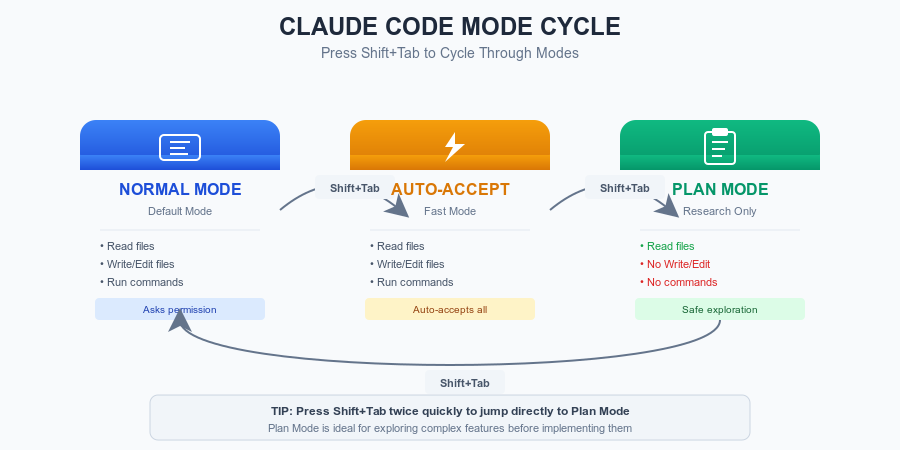 Figure 11.1: The three Claude Code
modes – Normal, Auto-accept, and Plan Mode – cycle through with
Shift+Tab.
Figure 11.1: The three Claude Code
modes – Normal, Auto-accept, and Plan Mode – cycle through with
Shift+Tab.
In Plan Mode, Claude can:
- Read files (Read tool)
- Search files (Grep, Glob tools)
- List directories
- Analyze code and propose architecture
In Plan Mode, Claude cannot:
- Edit or create files
- Run terminal commands
- Make any changes to your project
All changes require your explicit approval first.
Think of it like hiring an architect before construction: the architect studies the site, proposes blueprints, and gets your approval before a single brick is laid.
11.2 When to Use Plan Mode
Use Plan Mode for:
| Scenario | Why Planning Helps |
|---|---|
| Multi-file features (5+ files) | Ensures consistent architecture across files |
| Architectural decisions | Evaluates trade-offs before committing |
| Unfamiliar domains (OAuth, payments) | Surfaces edge cases and security concerns early |
| Large-scale refactoring | Creates a systematic migration path |
| Features taking more than 2 hours | Prevents costly mid-implementation pivots |
Skip Plan Mode for:
- One-file changes (“update the button color”)
- Simple bug fixes with clear solutions
- Tasks with detailed specifications already written
- Quick utility functions
Rule of thumb: If you are not 100% sure how to approach a task, or it touches multiple files, use Plan Mode.
11.3 The Research-Plan-Execute Workflow
The most effective way to use Plan Mode follows three phases:
Phase 1: RESEARCH (Plan Mode)
  Claude reads your codebase, asks clarifying questions,
  and gathers context about existing patterns.
      |
      v
Phase 2: PLAN (Plan Mode)
  Claude proposes architecture, data models, API endpoints,
  file structure, and implementation steps.
      |
      v  (You review and approve)
Phase 3: EXECUTE (Normal Mode)
  Claude implements the approved plan step by step,
  checking off each item.
Phase 1: Research – Gathering Context
Good plans start with good questions. When you enter Plan Mode and describe a feature, Claude should ask clarifying questions before proposing anything:
You: "Plan a notification system for our app"

Claude (Plan Mode): Before I design this, I need to understand:

1. **Types:** What triggers notifications? (mentions, orders, system alerts?)
2. **Delivery:** In-app only, or also email/push?
3. **Real-time:** Do notifications need to appear instantly?
4. **Existing patterns:** Do you have a messaging system I should study?

Let me also read your codebase to understand the current architecture...

[Reads package.json, database schema, existing API patterns]
Pro tip: If Claude does not ask questions and jumps straight to a plan, say: “Before planning, what questions do you have? What existing code should you study first?”
Phase 2: Plan – Proposing the Solution
After gathering context, Claude generates a structured plan. A good plan includes:
Claude (Plan Mode):

# Notification System Plan

## Architecture
- New `notifications` table in PostgreSQL
- WebSocket connection for real-time delivery
- Background job for email notifications

## Database Schema
model Notification {
  id        String   @id @default(uuid())
  userId    String
  type      String   // "mention", "order_update", "system"
  title     String
  body      String
  read      Boolean  @default(false)
  createdAt DateTime @default(now())
}

## API Endpoints
- GET  /api/notifications     (list user's notifications)
- PATCH /api/notifications/:id (mark as read)
- POST /api/notifications     (internal: create notification)

## Files to Create (7 total)
1. prisma migration
2. src/lib/notifications.ts (core logic)
3. src/app/api/notifications/route.ts
4. src/app/api/notifications/[id]/route.ts
5. src/components/NotificationBell.tsx
6. src/components/NotificationList.tsx
7. tests/notifications.test.ts

## Implementation Order
Step 1: Database migration (30 min)
Step 2: Core logic + API endpoints (2 hours)
Step 3: Frontend components (2 hours)
Step 4: WebSocket integration (1 hour)
Step 5: Tests (1 hour)

Total estimate: 6-7 hours

Does this plan look right? Any changes before we start?
Reviewing the plan – what to check:
- Does the database schema match your existing patterns?
- Are the API endpoints consistent with your current API style?
- Are there missing edge cases? (What happens when a user has 10,000 notifications?)
- Is the estimated time realistic for your skill level?
Phase 3: Execute – Implementing Step by Step
Once you approve, switch to Normal Mode and implement in phases:
You: "Plan approved. Start with Step 1: database migration."

Claude: Creating prisma migration...
[Creates migration file, runs prisma migrate dev]
Migration complete. Step 1 done.

Ready for Step 2?

You: "Step 2 looks good. Proceed."

Claude: Creating notification service...
[Creates src/lib/notifications.ts]
[Creates API route handlers]
Step 2 complete. All endpoints working.
Implementing in explicit steps keeps Claude aligned with the plan. If Claude drifts, you catch it immediately.
11.4 Writing Good Specifications
A specification is a written description of what to build, created before implementation. You can write specs yourself or have Claude generate them in Plan Mode.
A good spec answers six questions:
| Question | Example |
|---|---|
| What does it do? | “Password reset via email” |
| Why are we building it? | “Users forget passwords, creating support tickets” |
| How will it work technically? | “Secure token stored hashed, 1-hour expiry” |
| What are the requirements? | “Rate limiting, no email enumeration” |
| What are the edge cases? | “Expired link, used link, invalid email” |
| How do we verify it works? | “User can reset password and log in with new one” |
Generating Specs with Plan Mode
You (Plan Mode): "Create a specification for a password reset feature.
                  We use Next.js, PostgreSQL with Prisma, and SendGrid for email."

Claude: Here is the specification:

# Password Reset Specification

## Overview
Allow users to reset forgotten passwords via a secure email link.

## User Flow
1. User clicks "Forgot Password" on login page
2. User enters email, system sends reset link
3. User clicks link, enters new password
4. System validates token, updates password, logs user in

## Requirements
- Cryptographically random token (32 bytes, base64url)
- Token stored as SHA-256 hash (never plain text)
- Token expires after 1 hour
- Single-use: token invalidated after use
- Rate limit: 3 requests per hour per email
- Same response for valid/invalid emails (prevent enumeration)

## Edge Cases
- Email not in system: return success anyway (security)
- Token expired: show error with "request new link" option
- Token already used: show error with "request new link" option
- Multiple reset requests: only newest token works

## Acceptance Criteria
- [ ] User can request reset and receive email within 30 seconds
- [ ] Reset link loads a functional password form
- [ ] New password works for login; old password does not
- [ ] Expired and used tokens are properly rejected
- [ ] Rate limiting prevents abuse

## Files Needed
- Database migration (password_resets table)
- Token generation and validation logic
- Two API endpoints (request reset, perform reset)
- Two frontend pages (request form, reset form)
- Email template
- Tests (unit + integration)
This spec is specific enough for Claude to implement correctly, but does not dictate variable names or line-by-line code. It defines the what and why, and lets Claude determine the how.
Try This Now: Plan a Feature You Need
Pick a feature from your current project (or invent one). Enter Plan Mode and ask Claude to plan it.
Exercise 1: Basic Plan Mode
- Open Claude Code and press Shift+Tab twice to enter Plan Mode
- Describe a feature: “Plan a [your feature] for a [your tech stack] application”
- Answer Claude’s clarifying questions
- Review the generated plan
- Identify one thing you would change before approving
What to look for in Claude’s plan:
- Did it ask clarifying questions first?
- Does the database schema match your patterns?
- Are estimated times realistic?
- Did it consider edge cases?
Exercise 2: From Plan to Spec
Take the plan from Exercise 1 and ask Claude to convert it into a formal specification:
You (Plan Mode): "Convert this plan into a detailed specification with
                  requirements, edge cases, and acceptance criteria."
Compare the specification against the six-question checklist above. Is anything missing?
11.5 Plan Mode vs. Just Asking Claude to Code
You might wonder: why not just tell Claude to build the feature directly? Here is what typically happens:
Without Plan Mode:
You: "Build a payment system with Stripe"
Claude: [Starts implementing immediately]
        [Makes assumptions about your architecture]
        [Uses patterns that don't match your codebase]
        [Misses edge cases you'd have caught in review]

Result: 4 hours of work, then 3 hours of rework
With Plan Mode:
You (Plan Mode): "Plan a payment system with Stripe"
Claude: [Asks about your existing architecture]
        [Proposes a plan consistent with your patterns]
        [You catch the edge case about failed webhooks]
        [You adjust the plan before any code is written]

You: "Plan approved. Implement."
Claude: [Follows the agreed plan]

Result: 1 hour planning + 4 hours implementation, minimal rework
The key difference: plans are cheap to change, code is expensive to change. Spending 30 minutes refining a plan can save hours of refactoring.
Deep Dive (optional)
11.6 When Things Go Wrong
Problem: Plan is too vague
Symptom: Claude generates a plan that says “Create API endpoints” without specifying which endpoints, request/response formats, or error handling.
Fix: Provide more context and ask for specifics:
You: "The plan is too high-level. Please expand with:
     - Exact API endpoint paths and methods
     - Request and response schemas
     - Error codes for each failure mode
     - Database schema with column types"
Prevention: Include your tech stack, existing patterns, and desired detail level in your initial request.
Problem: Plan is too detailed
Symptom: Claude generates a 50-page specification with variable names, line-by-line pseudocode, and implementation details that leave nothing for the AI to decide.
Fix: Tell Claude to focus on the what, not the how:
You: "This is too detailed. I want requirements and constraints,
     not implementation steps. Tell me WHAT the feature should do
     and let me decide HOW during implementation."
Prevention: Specify the level of detail you want: “Create a plan at the architecture level, not the code level.”
Problem: Claude ignores the plan during implementation
Symptom: You approve a plan specifying Redis for caching, but during implementation Claude uses an in-memory cache instead.
Fix: Reference the plan explicitly during implementation:
You: "The approved plan specifies Redis for caching. Please implement
     using Redis as specified, not in-memory caching. If the plan
     needs to change, stop and discuss before deviating."
Prevention:
- Save the plan as a file (PLAN.md) in your project so Claude can reference it
- Implement in small phases with verification after each step
- Say “follow the plan exactly” when transitioning to implementation
Problem: Plan does not account for existing code
Symptom: Claude proposes a plan that ignores your existing authentication system, database patterns, or API conventions.
Fix: Share your architecture before planning:
You (Plan Mode): "Before planning, read these files to understand our patterns:
     - src/middleware/auth.ts (authentication)
     - src/api/users/route.ts (API pattern example)
     - prisma/schema.prisma (database schema)

     Now plan the notification feature to integrate with these patterns."
Prevention: Use a CLAUDE.md file (covered in Chapter 12) to give Claude persistent context about your project. Or start every Plan Mode session by asking Claude to read your architecture first.
Problem: Plan is too large to implement
Symptom: You ask Claude to plan an entire e-commerce platform and get a 6-month specification with 100+ files.
Fix: Request phased planning with an MVP first:
You: "This is too large. Plan only the MVP:
     Phase 1 (2 weeks): What is the minimum set of features to prove value?
     Detail Phase 1 only. We will plan Phase 2 after Phase 1 ships."
Prevention: Constrain your requests with timeline and scope: “Plan a checkout flow that can be built in 1 week by one developer.”
11.7 Best Practices Summary
Provide context first. Share your tech stack, existing patterns, and constraints before asking for a plan.
Review plans before approving. Plans are cheap to change. Read them carefully, ask questions, and suggest improvements.
Implement in phases. After approving, execute one step at a time. Verify each step matches the plan before continuing.
Save plans as files. Write approved plans to PLAN.md or a specs/ directory so they persist across sessions and serve as documentation.
Iterate on plans, not code. If requirements change mid-implementation, update the plan first, then adjust the code.
State constraints upfront. Budget, timeline, hosting limitations, and team size should be in your initial request.
Chapter Checkpoint
5-Bullet Summary:
Plan Mode is a read-only mode (Shift+Tab twice) where Claude analyzes and proposes without making changes, giving you a chance to review before any code is written.
The Research-Plan-Execute workflow produces better results than direct implementation because it catches misunderstandings and edge cases before code exists.
Good specifications answer six questions: what, why, how, requirements, edge cases, and verification criteria.
Plans are cheap to change (minutes), code is expensive to change (hours) – invest time in planning for any feature touching multiple files.
When Claude deviates from an approved plan during implementation, stop it immediately, reference the plan, and redirect. Save plans as files for persistent reference.
You can confidently: