 PROMPT TO PRODUCTION
Chapter 12: Specification-Driven Development
Quick Start (5 minutes)
Goal: Create a CLAUDE.md file that gives Claude Code persistent context about your project.
CLAUDE.md is a markdown file that Claude Code automatically reads at the start of every session. It is the single most impactful thing you can do to improve AI-assisted development.
Step 1: Create the file
mkdir -p .claudeStep 2: Add your project context
Create .claude/CLAUDE.md with this template, customized
for your project:
# Project: [Your Project Name]

## Tech Stack
- **Language:** [e.g., TypeScript, Python]
- **Framework:** [e.g., Next.js, Django]
- **Database:** [e.g., PostgreSQL, MongoDB]
- **Deployment:** [e.g., Vercel, AWS]

## Common Commands
npm run dev          # Start development
npm test             # Run tests
npm run build        # Production build

## Project Structure
src/
  app/        # Routes and pages
  components/ # UI components
  lib/        # Utilities and business logic
  tests/      # Test files

## Code Standards
- Use TypeScript strict mode
- Functional components only (no class components)
- Prisma ORM for all database access (no raw SQL)
- Test coverage minimum: 80%
- File naming: PascalCase for components, camelCase for utilities

## Critical Rules
- NEVER store secrets in code (use environment variables)
- ALWAYS validate input server-side
- ALWAYS write tests for business logic
Step 3: Commit it
git add .claude/CLAUDE.md
git commit -m "Add CLAUDE.md project context"
Done. Claude Code will now read this file automatically in every session, making consistent decisions about your tech stack, patterns, and conventions.
Core Concepts (15-20 minutes)
12.1 The Vibe Coding Problem
“Vibe coding” is iterating with AI without upfront specifications, making architectural decisions on the fly and hoping the AI remembers context across sessions.
Here is what it looks like in practice:
Monday:
You: "Build a payment system with Stripe"
Claude: [Creates 15 files using pattern X]

Tuesday (new session):
You: "Add refund functionality"
Claude: [Has no memory of Monday's patterns]
        [Uses different error handling, different naming]
        [Creates inconsistent implementation]

Wednesday:
You: "Why don't these pieces work together?"
This happens because each Claude Code session starts fresh. Without persistent context, the AI makes different assumptions every time.
The Research Reality: Mixed Results
Before going further, let us be honest about what research says about AI-assisted coding.
Studies show conflicting results. GitHub Copilot research found 55% faster task completion in controlled trials. But a 2025 METR study found experienced open-source developers were actually 19% slower with AI tools, despite perceiving themselves as 20% faster.
How do we reconcile this? The key variable is specification quality:
- Well-specified tasks (clear requirements, defined scope) show significant speed gains with AI tools. The AI knows exactly what to build and can execute efficiently.
- Poorly-specified tasks (vague goals, no constraints) show speed losses. The AI makes wrong assumptions, you spend time correcting, and rework compounds.
This chapter is about making sure your tasks fall into the first category.
Why Specifications Fix Vibe Coding
Specifications solve three problems:
1. Persistent memory. A CLAUDE.md file or spec document persists across sessions. Claude reads it every time and makes consistent decisions.
2. Correct assumptions. Instead of guessing your tech stack, API patterns, and conventions, Claude reads them from the spec. First-time implementation accuracy goes up dramatically.
3. Measurable progress. With acceptance criteria written down, you can objectively verify whether a feature is done.
Without spec:  Vague idea --> AI codes --> Looks wrong --> Try again --> Rework
With spec:     Specify what/why --> AI plans how --> Implement --> Verify against spec
12.2 CLAUDE.md: Persistent Project Context
CLAUDE.md is a special file that Claude Code automatically loads at the start of every conversation. Think of it as an onboarding document for the AI.
How It Works
Every time you start Claude Code:
1. Claude Code scans for .claude/CLAUDE.md
2. Loads the content into conversation context
3. Follows the instructions throughout the session
Hierarchical loading: Claude Code checks multiple locations, with more specific files taking priority:
~/.claude/CLAUDE.md                        (Global: all projects)
~/projects/.claude/CLAUDE.md               (Directory level)
~/projects/my-app/.claude/CLAUDE.md        (Project level -- most common)
~/projects/my-app/src/admin/.claude/CLAUDE.md  (Subdirectory level)
Most developers only need a project-level CLAUDE.md. Use subdirectory files only when a folder has significantly different conventions (e.g., an admin panel with different UI patterns).
What to Include
Essential sections (aim for 50-80 lines):
| Section | Purpose | Example |
|---|---|---|
| Overview | What is this project? | “Task management app with team features” |
| Tech Stack | Languages, frameworks, tools | “Next.js 14, TypeScript, PostgreSQL, Prisma” |
| Common Commands | How to run, test, build | “npm run dev, npm test, npm run build” |
| Project Structure | Where things live | “src/app/ for routes, src/lib/ for utilities” |
| Code Standards | How code should look | “Functional components, 80% test coverage” |
| Critical Rules | What to never do | “NEVER use raw SQL, ALWAYS validate server-side” |
| Gotchas | Known pitfalls | “Run prisma generate after schema changes” |
Keep it under 100 lines. Claude reads this every session. Long files waste tokens, slow processing, and bury important information. Link to full documentation for details:
## Database Schema
Key tables: users, products, orders
Full schema details: docs/database/schema.md
Best Practices
1. Front-load critical information. Claude reads top to bottom. Put tech stack and critical rules first, not git commit message format.
2. Be specific about what NOT to do. Vague rules like “write good code” are useless. Specific rules work:
NEVER use raw SQL queries. Always use Prisma ORM.
NEVER store API keys in code. Use environment variables.
NEVER use class components. Use functional components only.
3. Update when context changes. Add “Update CLAUDE.md” to your sprint review checklist. Outdated information (wrong tech stack, old commands) causes Claude to make wrong assumptions.
4. Commit to your repository. Every team member gets the same context. New developers (and new Claude sessions) onboard instantly.
Real-World Example
Here is a CLAUDE.md for an e-commerce platform:
# ShopFlow: Multi-Vendor Marketplace

## Tech Stack
- Frontend: Next.js 14, React Server Components, TypeScript
- Styling: Tailwind CSS, shadcn/ui
- Backend: tRPC for type-safe APIs, REST for webhooks only
- Database: PostgreSQL with Prisma ORM
- Payments: Stripe Connect (multi-vendor)
- Auth: NextAuth.js
- Deployment: Vercel (frontend), AWS RDS (database)

## Commands
npm run dev          # Dev server at localhost:3000
npm test             # Run all tests
npm run build        # Production build
npm run db:push      # Sync Prisma schema
npm run db:seed      # Seed with test data
npm run stripe:listen # Local Stripe webhooks

## Structure
src/app/         # Next.js App Router (routes)
src/components/  # React components (ui/ for shadcn, custom/ for ours)
src/lib/api/     # tRPC route definitions
src/lib/db/      # Prisma client (singleton)
src/lib/utils/   # Helper functions

## Standards
- Server Components by default; 'use client' only for interactivity
- Prisma for ALL database access (no raw SQL)
- TypeScript strict mode, no `any` types
- Functions max 50 lines
- Test coverage: 80% for business logic, 60% for UI

## Critical Rules
- NEVER process payments without Stripe Connect
- NEVER store credit card info (PCI compliance)
- NEVER commit directly to main branch
- ALWAYS validate inputs server-side with Zod schemas
- ALWAYS use protectedProcedure for authenticated tRPC routes

## Gotchas
- Use singleton Prisma client (lib/db/client.ts) to avoid memory leaks
- Stripe webhooks need signature verification (STRIPE_WEBHOOK_SECRET)
- next/image requires width and height props to prevent layout shift

## Current Focus
Sprint 12: Vendor analytics dashboard
12.3 Product Requirements Documents (PRDs)
CLAUDE.md gives Claude persistent context about your project. PRDs go further by specifying what an individual feature should do.
A PRD describes what you are building, why, and for whom, without dictating how to implement it. Claude determines the implementation; you define the requirements.
PRD Template
# Feature PRD: [Feature Name]

## 1. Overview
**What:** [One sentence describing the feature]
**Why:** [Business value or user problem solved]
**Who:** [Target users]

## 2. User Stories
- As a [user type], I want [capability], so that [benefit]

## 3. Functional Requirements
### Must Have (P0)
- [ ] Requirement 1
- [ ] Requirement 2

### Should Have (P1)
- [ ] Requirement 3

### Nice to Have (P2)
- [ ] Requirement 4

## 4. Non-Functional Requirements
- **Performance:** [Response times, load capacity]
- **Security:** [Auth, validation, data protection]
- **Accessibility:** [WCAG level]

## 5. Technical Constraints
- **Tech stack:** [Must use X, cannot use Y]
- **Integrations:** [APIs, third-party services]

## 6. Acceptance Criteria
Feature is done when:
- [ ] Criterion 1
- [ ] Criterion 2
- [ ] All tests passing

## 7. Edge Cases
- **Edge case 1:** [Scenario] --> [Expected behavior]
- **Edge case 2:** [Scenario] --> [Expected behavior]

## 8. Out of Scope
- [ ] Not included in this feature (future work)
The Goldilocks Principle
The most common PRD mistake is wrong level of detail.
Too vague (Claude has to guess everything):
Requirements:
- Add user authentication
- Make it secure
Too detailed (you are writing the code yourself):
Requirements:
- On line 47, add function validatePassword
- Use regex /^(?=.*[A-Z])(?=.*[0-9]).{8,}$/
- Store in variable called isValid
Just right (Claude knows what to build, decides how):
Requirements:
- JWT-based authentication with refresh tokens
- Password: min 8 chars, 1 uppercase, 1 number, 1 special character
- Access tokens valid 1 hour, refresh tokens valid 7 days
- Store tokens in httpOnly cookies (XSS protection)
- Rate limit: 5 failed login attempts per 15 minutes
Guideline: Specify business requirements, technical constraints, and success criteria. Do not specify variable names, exact algorithms, or line-by-line implementation.
Using PRDs with Claude
Save your PRD as a markdown file and reference it:
You: "Implement the feature described in docs/features/auth.md"

Claude: [Reads the PRD]
        [Asks 2-3 clarifying questions about ambiguities]
        [Proposes implementation plan]
        [You approve]
        [Builds exactly what was specified]
Try This Now: Write a CLAUDE.md and a Mini-PRD
Exercise 1: Create a CLAUDE.md
For your current project (or an imaginary one), create a CLAUDE.md file that includes:
- Project overview (1-2 sentences)
- Tech stack
- Three common commands
- Project structure
- Three critical rules (NEVER/ALWAYS)
- Two gotchas
Acceptance criteria: Under 80 lines, specific enough that Claude would make correct decisions about your project.
Exercise 2: Write a Mini-PRD
Pick a feature (real or imagined) and write a PRD using the template above. Include at minimum:
- Overview (What/Why/Who)
- Three must-have requirements
- Two acceptance criteria
- Two edge cases
Tip: Try giving your PRD to Claude and asking it to plan the feature. Does it ask good clarifying questions? Does the proposed plan match your expectations?
12.4 Specification Tools: Spec Kit and AgentOS
Once you outgrow CLAUDE.md and simple PRDs, two tools provide more structured specification workflows. Most developers never need these, but they exist for teams with specific requirements.
GitHub Spec Kit
What it is: An open-source toolkit by GitHub providing a 5-phase specification workflow with dedicated slash commands.
The 5 phases:
Phase 1: CONSTITUTION -- Define project principles and governance
Phase 2: SPECIFY      -- Describe WHAT to build and WHY
Phase 3: PLAN         -- Document technical architecture and HOW
Phase 4: TASKS        -- Break down into actionable implementation steps
Phase 5: IMPLEMENT    -- Execute according to plan with AI assistance
Each phase produces a document that becomes input for the next phase. Quality gates between phases prevent proceeding without completing the previous step.
When to use it:
- Teams larger than 20 developers
- Projects requiring formal documentation or compliance
- Enterprise environments with approval processes
- Regulated industries (healthcare, finance, government)
When to skip it:
- Solo developers or small teams (2-5 people)
- Fast-moving startups prioritizing speed
- Features taking less than 1 week
- Projects without formal review requirements
Setup: Install via
uv tool install specify-cli --from git+https://github.com/github/spec-kit.git.
Verify the repository URL is current before installation, as this
ecosystem evolves quickly.
AgentOS Pattern
What it is: A 3-layer context management pattern that organizes project documentation into Standards, Product, and Specs layers.
The 3 layers:
Layer 1: STANDARDS (.claude/standards/)
  Project-wide conventions: coding style, testing requirements, security rules.
  Updated rarely (quarterly or when tech changes).

Layer 2: PRODUCT (.claude/product/)
  Product vision and architecture: system design, data models, API contracts.
  Updated monthly as the product evolves.

Layer 3: SPECS (.claude/specs/)
  Feature-specific requirements: one file per feature with requirements,
  acceptance criteria, and implementation approach.
  Created as needed for each new feature.
When Claude starts a conversation, it reads all three layers:
- Standards tell it how to code
- Product tells it what the system looks like
- Specs tell it what this specific feature should do
When to use it:
- Teams of 3-15 developers experiencing context loss
- Projects where the AI keeps forgetting previous decisions
- Startups that need structure without bureaucracy
When to skip it:
- Solo developers where CLAUDE.md is sufficient
- Very small projects (under 10 files)
Choosing Your Approach
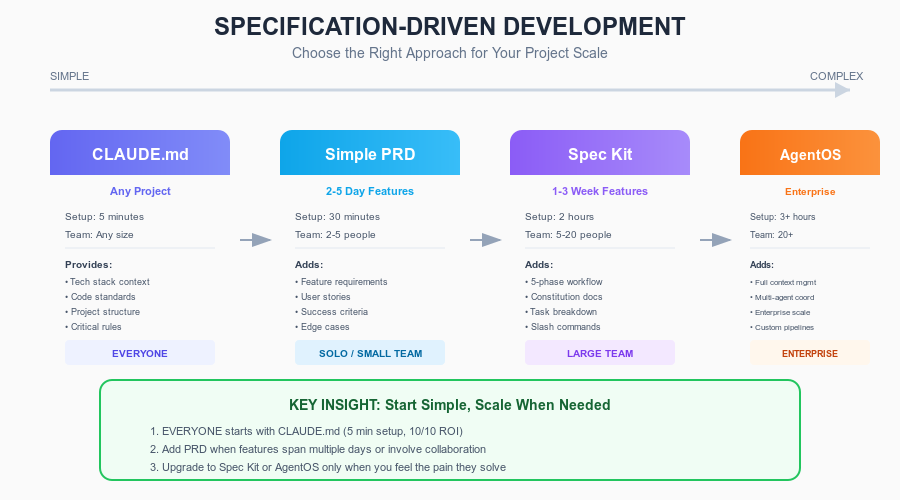 Figure 12.1: Choose the
right specification approach based on project scale, from CLAUDE.md for
everyone to Spec Kit for enterprise.
Figure 12.1: Choose the
right specification approach based on project scale, from CLAUDE.md for
everyone to Spec Kit for enterprise.
Most developers follow this progression:
Day 1:   CLAUDE.md (5 minutes, everyone should do this)
           |
Week 2:  Still working? Stop here. CLAUDE.md is enough for 90% of developers.
           |
Month 1: Experiencing context loss? --> Add AgentOS 3-layer pattern
         Need formal docs?          --> Add Spec Kit
           |
Month 2+: Refine based on what works for your team
The honest recommendation: Start with CLAUDE.md today. If after two weeks you find the AI keeps forgetting context or your team is misaligned, add the AgentOS pattern. Only adopt Spec Kit if you genuinely need formal approval processes.
Deep Dive (optional)
12.5 When Things Go Wrong
Problem: CLAUDE.md is too long and Claude ignores parts of it
Symptom: Your CLAUDE.md is 300+ lines. Claude follows some rules but ignores others, especially those near the bottom of the file.
Fix: Cut it to under 100 lines. Move detailed documentation to separate files and link to them:
## Database
Key tables: users, products, orders
Full schema: docs/database-schema.md

## API Conventions
Pattern: see src/api/users/route.ts as reference
Full API docs: docs/api-reference.md
Prevention: Treat CLAUDE.md like a cheat sheet, not a manual. Only include information that Claude needs in every session.
Problem: Specs are too vague and Claude builds the wrong thing
Symptom: Your PRD says “add user authentication” and Claude implements OAuth with social login when you wanted simple email/password.
Fix: Add constraints to your spec:
## Technical Constraints
- Email/password ONLY (no social login in v1)
- MVP scope: login, register, logout
- NOT included: password reset, 2FA, remember me
Prevention: Always include an “Out of Scope” section in your PRDs. Be explicit about what you are not building.
Problem: Specs are too detailed and Claude follows them robotically
Symptom: You specified “use Redis for caching” but during implementation you realize your hosting does not support Redis. Claude refuses to adapt because the spec says Redis.
Fix: Distinguish requirements from suggestions in your specs:
### MUST (Non-Negotiable)
- Cache API responses (performance requirement)
- Cache invalidation on data update

### SHOULD (Preferred but flexible)
- Use Redis (if available in infrastructure)
- Alternative: in-memory LRU cache if Redis unavailable
Prevention: Specs should specify what outcome you need, not how to achieve it. “Cache API responses to achieve < 200ms response time” is better than “Use Redis.”
Problem: Spec does not match what you actually want
Symptom: You wrote a spec, Claude implemented it perfectly, but the result is not what you needed. The spec was wrong.
Fix: This is a requirements problem, not an AI problem. Before finalizing any spec:
- Walk through the user flow yourself (on paper or in your head)
- Ask: “If this feature worked exactly as specified, would I be happy?”
- Show the spec to a teammate for a quick review
Prevention: Use Claude in Plan Mode to generate spec drafts, then review them critically. Do not rubber-stamp AI-generated specs – they may technically make sense but miss your actual intent.
12.6 Advanced: Multi-Session Specification Workflow
For features spanning multiple days or sessions, specifications become especially important because they persist when Claude’s memory does not.
Workflow for multi-session features:
Session 1: Write and approve specification
  - Save as docs/specs/feature-name.md
  - Commit to git

Session 2: Implement Phase 1
  - Tell Claude: "Read docs/specs/feature-name.md, then implement Phase 1"
  - Claude reads the spec, maintains consistency

Session 3: Implement Phase 2
  - Tell Claude: "Read docs/specs/feature-name.md, then implement Phase 2"
  - Claude reads the same spec, stays aligned with Session 2

Session 4: Testing and polish
  - Tell Claude: "Read docs/specs/feature-name.md and verify the acceptance criteria"
  - Claude checks implementation against spec
Key principle: The spec file is the single source of truth. Every session starts by reading it. This eliminates context loss between sessions.
Sub-Agent Context Sharing
When using sub-agents (Claude spawning focused worker agents), specifications prevent them from making conflicting decisions:
Main conversation: "Read the checkout spec, then use a sub-agent for the database
                    schema and another for the API endpoints."

Sub-Agent 1 (Database): [Reads spec] --> Creates schema per spec Section 4
Sub-Agent 2 (API):      [Reads spec] --> Creates endpoints per spec Section 5

Both agents read the same spec, so the API matches the database schema.
Without the shared spec, Sub-Agent 2 might create endpoints that do not match Sub-Agent 1’s schema.
Chapter Checkpoint
5-Bullet Summary:
“Vibe coding” (iterating without specs) leads to inconsistent implementations, context loss between sessions, and AI making wrong assumptions. Research shows mixed speed results – specification quality is the key variable.
CLAUDE.md is the highest-ROI specification tool: 5 minutes of setup gives Claude persistent context about your tech stack, conventions, and rules in every session. Keep it under 100 lines.
PRDs (Product Requirements Documents) define what a feature should do without dictating how. Specify business requirements, constraints, and acceptance criteria at the “Goldilocks” detail level.
For larger teams, the AgentOS 3-layer pattern (Standards, Product, Specs) prevents context loss, and GitHub Spec Kit provides formal 5-phase workflows for enterprise environments. Most developers only need CLAUDE.md.
Specifications serve as persistent memory across sessions. For multi-day features, save specs as files and have Claude read them at the start of each session to maintain consistency.
You can confidently: