 PROMPT TO PRODUCTION
Chapter 15: Hooks and Model Context Protocol (MCP)
Learning Objectives
By the end of this chapter, you will be able to:
- Configure hooks in settings.json to automate repetitive tasks
- Use PreToolUse and PostToolUse hooks for quality gates and formatting
- Install and configure MCP servers for external service access
- Connect Claude Code to databases, GitHub, and other services via MCP
- Build basic custom MCP servers for company-specific needs
Quick Start: Hook + MCP in 5 Minutes
Your First Hook (2 minutes)
Goal: Auto-format every file Claude creates or edits.
mkdir -p .claude
cat > .claude/settings.json << 'EOF'
{
  "hooks": {
    "PostToolUse": [
      {
        "matcher": "Write|Edit",
        "hooks": [
          {
            "type": "command",
            "command": "npx prettier --write \"$CLAUDE_FILE_PATH\" 2>&1"
          }
        ]
      }
    ]
  }
}
EOF
Test it by asking Claude to create a file with messy formatting:
You: "Create a test file with poorly formatted code"

Claude: [Creates file]

[PostToolUse hook fires automatically:]
$ npx prettier --write test.js
test.js formatted

[File is now perfectly formatted -- no manual step needed]
Your First MCP Server (3 minutes)
Goal: Give Claude direct access to your PostgreSQL database.
cat > .claude/mcp.json << 'EOF'
{
  "mcpServers": {
    "postgres": {
      "command": "npx",
      "args": ["-y", "@modelcontextprotocol/server-postgres"],
      "env": {
        "POSTGRES_URL": "${DATABASE_URL}"
      }
    }
  }
}
EOF
Restart Claude Code, then:
You: "Show me users who signed up last week"

Claude: [Uses MCP postgres server]
Query: SELECT * FROM users WHERE created_at >= NOW() - INTERVAL '7 days'

Found 47 users who signed up in the last 7 days.
What you just did: Hooks automate actions triggered by Claude’s tool use. MCP extends Claude with access to external services. Together, they turn Claude Code into a fully integrated development environment.
Core Concepts
What Are Hooks?
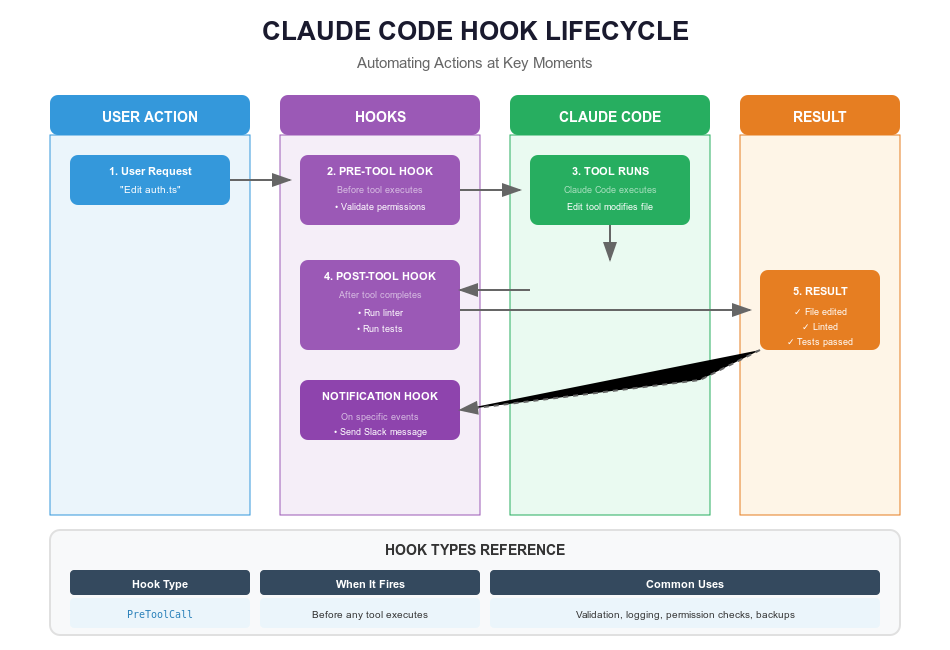
Hooks are shell commands that execute automatically when specific events occur in Claude Code. Think of them like event listeners in web development – you register a callback, and it fires whenever the matching event happens.
// Conceptual parallel:
// Web development            Claude Code hooks
button.on('click', fn)   //  PostToolUse: runs after Write/Edit
form.on('submit', fn)    //  PreToolUse: runs before Write/Edit (can block)
Definition: A hook is a user-defined shell command configured in
settings.jsonthat executes automatically when a specific Claude Code event fires.
The 4 Hook Events
Hooks are configured in .claude/settings.json
(project-level) or ~/.claude/settings.json (user-level)
under a "hooks" key.
1. PreToolUse – Runs BEFORE a tool executes. If the hook exits with a non-zero code, the tool call is blocked.
Use cases: security scanning, lint checks, validating command safety.
2. PostToolUse – Runs AFTER a tool completes successfully.
Use cases: auto-formatting, running tests, logging, notifications.
3. Notification – Runs when Claude sends a notification (e.g., waiting for input). The matcher field is typically empty.
Use cases: desktop notifications, sound alerts.
4. Stop – Runs when Claude completes a response. The matcher field is typically empty.
Use cases: session logging, final validation, completion alerts.
Hook Lifecycle
                         User Request
                              |
                              v
                    +-----------------+
                    |  Claude Code    |
                    |  Processes      |
                    |  Request        |
                    +--------+--------+
                             |
                             v
              +--------------------------+
              |  About to call tool?     |
              |  (Write/Edit/Bash/etc.)  |
              +------+-----------+-------+
                     |           |
                    YES         NO --> skip hooks
                     |
                     v
         +------------------------------+
         |  PreToolUse HOOK matches?    |
         +--+------------------+--------+
            |                  |
           YES                NO
            |                  |
            v                  |
   +--------------------+      |
   | Execute PreToolUse |      |
   | Hook Command       |      |
   +----+---------------+      |
        |                      |
        v                      |
   +------------+              |
   | Exit = 0?  |              |
   +--+-----+---+              |
      |     |                  |
     YES   NO                  |
      |     |                  |
      |     v                  |
      |  +----------------+    |
      |  | BLOCK Tool     |    |
      |  | (return error) |    |
      |  +----------------+    |
      |                        |
      |<-----------------------+
      |
      v
+-----------------+
|  Execute Tool   |
+--------+--------+
         |
         v (on success)
+-------------------------------+
| PostToolUse HOOK matches?     |
+--+--------------+-------------+
   |               |
  YES             NO
   |               |
   v               |
+--------------+   |
| Execute      |   |
| PostToolUse  |   |
+---------+----+   |
          |        |
          v<-------+
+------------------+
|  Return Result   |
+------------------+
Key points:
- Hooks receive data via stdin JSON (
tool_name,tool_input,session_id) and the$CLAUDE_FILE_PATHenvironment variable matcheris a regex pattern matching tool names (e.g.,"Write|Edit")- PreToolUse exit code 0 = allow, non-zero = block
- Always add
2>&1to capture both stdout and stderr - Keep hooks fast (under 5 seconds)
Hook Configuration Format
{
  "hooks": {
    "PreToolUse": [
      {
        "matcher": "Write|Edit",
        "hooks": [
          {
            "type": "command",
            "command": "./scripts/security-scan.sh"
          }
        ]
      }
    ],
    "PostToolUse": [
      {
        "matcher": "Write|Edit",
        "hooks": [
          {
            "type": "command",
            "command": "npx prettier --write \"$CLAUDE_FILE_PATH\" 2>&1"
          }
        ]
      }
    ],
    "Notification": [
      {
        "matcher": "",
        "hooks": [
          {
            "type": "command",
            "command": "terminal-notifier -message \"$CLAUDE_NOTIFICATION\""
          }
        ]
      }
    ]
  }
}
Each event type has an array of matcher objects. Each matcher has a
regex matcher field (matching tool names for
PreToolUse/PostToolUse) and a hooks array of command
objects.
Practical Hook Examples
Hook 1: Auto-Lint Before Writes
A PreToolUse hook that blocks writes if linting fails:
{
  "hooks": {
    "PreToolUse": [
      {
        "matcher": "Write|Edit",
        "hooks": [
          {
            "type": "command",
            "command": "./scripts/pre-write-lint.sh"
          }
        ]
      }
    ]
  }
}
Script: scripts/pre-write-lint.sh
#!/bin/bash
FILE="$CLAUDE_FILE_PATH"

if [ -z "$FILE" ]; then
  INPUT=$(cat -)
  FILE=$(echo "$INPUT" | jq -r '.tool_input.file_path // empty')
fi

if [[ "$FILE" =~ \.(js|ts|jsx|tsx)$ ]] && [ -f "$FILE" ]; then
  echo "Linting $FILE..."
  npx eslint "$FILE" --fix 2>&1

  if [ $? -ne 0 ]; then
    echo "Lint failed for $FILE"
    exit 1  # Blocks the tool call
  fi
  echo "Lint passed"
fi

exit 0
Hook 2: Run Related Tests After Edits
{
  "hooks": {
    "PostToolUse": [
      {
        "matcher": "Write|Edit",
        "hooks": [
          {
            "type": "command",
            "command": "./scripts/test-related.sh"
          }
        ]
      }
    ]
  }
}
Script: scripts/test-related.sh
#!/bin/bash
FILE="$CLAUDE_FILE_PATH"

if [ -z "$FILE" ]; then
  INPUT=$(cat -)
  FILE=$(echo "$INPUT" | jq -r '.tool_input.file_path // empty')
fi

# Find related test file
if [[ "$FILE" == *".test."* ]] || [[ "$FILE" == *".spec."* ]]; then
  TEST_FILE="$FILE"
else
  TEST_FILE="${FILE/.js/.test.js}"
  TEST_FILE="${TEST_FILE/.ts/.test.ts}"
fi

if [ -f "$TEST_FILE" ]; then
  echo "Running tests for $FILE..."
  npm test "$TEST_FILE" 2>&1
  [ $? -eq 0 ] && echo "Tests passed" || echo "Tests failed - review needed"
else
  echo "No test file found for $FILE"
fi

exit 0  # Don't block workflow on test failure
Hook 3: Security Scan Before Writes
#!/bin/bash
# scripts/security-scan.sh
INPUT=$(cat -)
FILE=$(echo "$INPUT" | jq -r '.tool_input.file_path // empty')
[ -z "$FILE" ] && FILE="$CLAUDE_FILE_PATH"
[ -z "$FILE" ] || [ ! -f "$FILE" ] && exit 0

echo "Security scanning $FILE..."
ISSUES=0

# Check for hardcoded secrets
if grep -iE '(api[_-]?key|password|secret|token).*=.*["\047][^"\047]+["\047]' "$FILE" > /dev/null 2>&1; then
  echo "WARNING: Possible hardcoded secret detected"
  ISSUES=$((ISSUES + 1))
fi

# Check for SQL injection risks
if grep -E 'query.*\$\{|query.*\+.*req\.' "$FILE" > /dev/null 2>&1; then
  echo "WARNING: Possible SQL injection risk"
  ISSUES=$((ISSUES + 1))
fi

if [ $ISSUES -eq 0 ]; then
  echo "No security issues detected"
  exit 0
else
  echo "$ISSUES security issue(s) found - review required"
  exit 1  # Block the write
fi
Hook 4: Git Auto-Commit
#!/bin/bash
# scripts/auto-commit.sh
FILE="$CLAUDE_FILE_PATH"
[ -z "$FILE" ] && { INPUT=$(cat -); FILE=$(echo "$INPUT" | jq -r '.tool_input.file_path // empty'); }

if [ -n "$FILE" ] && git rev-parse --git-dir > /dev/null 2>&1; then
  git add "$FILE"
  git commit -m "Update $FILE

Auto-committed via Claude Code hook

Co-Authored-By: Claude <noreply@anthropic.com>" 2>&1
  echo "Committed: $FILE"
fi
What Is MCP?
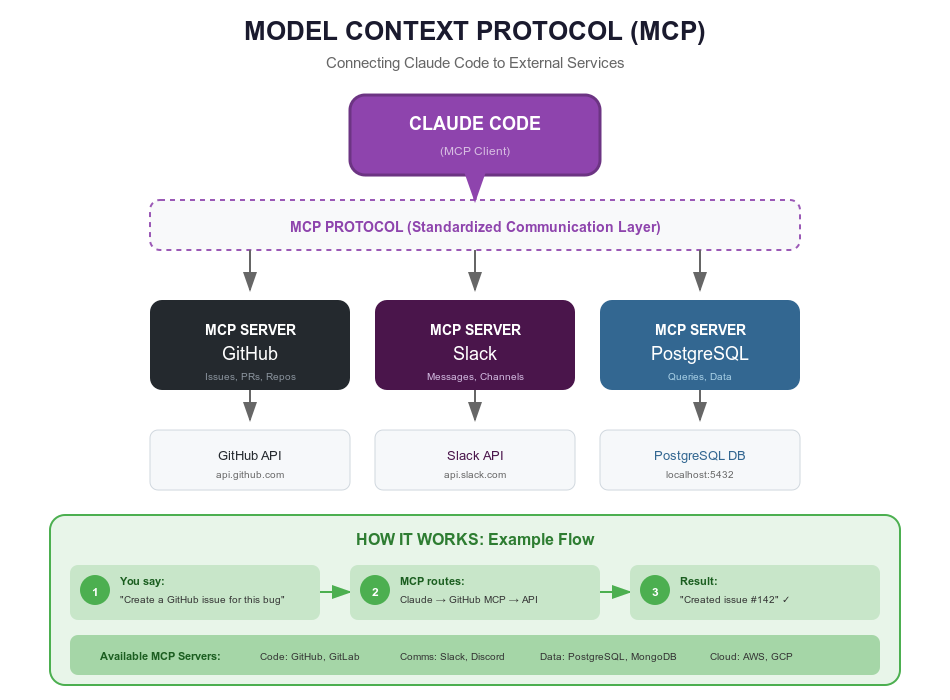
Model Context Protocol (MCP) is an open standard for connecting Claude Code to external tools, databases, and services. Think of it like an app store: Claude Code has built-in tools (Read, Write, Bash, Grep), and MCP lets you install more (Postgres, GitHub, Slack, custom APIs).
Definition: MCP is an open protocol that enables Claude Code to securely connect to external services, extending its capabilities beyond built-in file and shell tools.
MCP Architecture
                              USER
                               |
                               | Natural language request
                               v
                    +----------------------+
                    |                      |
                    |    CLAUDE CODE       |
                    |                      |
                    |  Built-in Tools:     |
                    |  - Read/Write/Edit   |
                    |  - Bash/Grep         |
                    |                      |
                    +----------+-----------+
                               |
                               | Decides which tool/capability to use
                               |
            +------------------+------------------+
            |                                     |
    Built-in Tools                        MCP PROTOCOL
            |                                     |
            v                                     v
    +---------------+              +-----------------------------+
    | Execute       |              |    MCP Server Manager       |
    | Directly      |              |                             |
    +---------------+              | Routes to configured        |
                                   | MCP servers                 |
                                   +----------+------------------+
                                              |
                    +-------------------------+-------------------------+
                    |                         |                         |
                    v                         v                         v
            +---------------+        +---------------+        +---------------+
            |  MCP Server   |        |  MCP Server   |        |  MCP Server   |
            |  (Database)   |        |  (GitHub)     |        |  (Custom)     |
            +-------+-------+        +-------+-------+        +-------+-------+
                    |                        |                        |
                    v                        v                        v
              PostgreSQL              GitHub API                Your APIs
Each MCP server can provide resources (data sources), tools (executable operations), and prompts (pre-written templates). MCP servers communicate with Claude Code via stdin/stdout using a standardized JSON protocol.
Configuring MCP Servers
MCP servers are configured in .claude/mcp.json:
{
  "mcpServers": {
    "postgres": {
      "command": "npx",
      "args": ["-y", "@modelcontextprotocol/server-postgres"],
      "env": {
        "POSTGRES_URL": "${DATABASE_URL}"
      }
    },
    "github": {
      "command": "npx",
      "args": ["-y", "@modelcontextprotocol/server-github"],
      "env": {
        "GITHUB_TOKEN": "${GITHUB_TOKEN}"
      }
    },
    "filesystem": {
      "command": "npx",
      "args": ["-y", "@modelcontextprotocol/server-filesystem", "/path/to/allowed/dir"]
    }
  }
}
After creating or updating .claude/mcp.json, restart
Claude Code to activate the servers.
Important: Use ${ENV_VAR} syntax for
secrets, and keep actual values in .env (added to
.gitignore). Never commit tokens or passwords to version
control.
MCP Example: PostgreSQL
Configuration:
{
  "mcpServers": {
    "postgres": {
      "command": "npx",
      "args": ["-y", "@modelcontextprotocol/server-postgres"],
      "env": {
        "POSTGRES_URL": "${DATABASE_URL}"
      }
    }
  }
}
Usage:
You: "Find users with incomplete profiles"

Claude: [MCP: postgres query]
SELECT id, email, name FROM users
WHERE bio IS NULL OR avatar IS NULL LIMIT 50

Found 23 users with incomplete profiles.
MCP Example: GitHub
Configuration:
{
  "mcpServers": {
    "github": {
      "command": "npx",
      "args": ["-y", "@modelcontextprotocol/server-github"],
      "env": {
        "GITHUB_TOKEN": "${GITHUB_TOKEN}"
      }
    }
  }
}
Usage:
You: "Show me all open PRs and their review status"

Claude: [MCP: github fetch PRs]

Open Pull Requests (7):
1. #123: "Add user authentication" - 2 approvals, CI passing
2. #124: "Refactor database layer" - Changes requested, CI running
[... etc.]
MCP Example: Filesystem
The filesystem MCP server gives Claude controlled access to directories outside the current project:
{
  "mcpServers": {
    "filesystem": {
      "command": "npx",
      "args": ["-y", "@modelcontextprotocol/server-filesystem", "/Users/you/Documents"]
    }
  }
}
Other popular MCP servers include Slack (team notifications), Jira (ticket management), and various community-built servers for services like Sentry, Linear, and Notion.
Try This Now
Exercise 1: Set up an auto-format hook (10 minutes)
- Create
.claude/settings.jsonwith the PostToolUse formatter hook shown in Quick Start - Ask Claude to create a file with intentionally messy formatting
- Verify the file was auto-formatted by the hook
- Check that the hook output is visible (you should see “formatted” in the output)
Exercise 2: Configure an MCP server (15 minutes)
Choose one MCP server to set up:
- PostgreSQL – if you have a local database running
- GitHub – if you have a GitHub token (Settings > Developer settings > Personal access tokens)
- Filesystem – the simplest option, needs no credentials
Create .claude/mcp.json with the appropriate
configuration, restart Claude Code, and test a query.
Deep Dive
Advanced Hook Patterns
Multi-Stage Hooks
Combine PreToolUse and PostToolUse for a complete quality pipeline:
{
  "hooks": {
    "PreToolUse": [
      {
        "matcher": "Write|Edit",
        "hooks": [
          {
            "type": "command",
            "command": "./scripts/pre-write-check.sh"
          }
        ]
      }
    ],
    "PostToolUse": [
      {
        "matcher": "Write|Edit",
        "hooks": [
          {
            "type": "command",
            "command": "./scripts/post-write-workflow.sh"
          }
        ]
      }
    ]
  }
}
The pre-write script runs security scans and lint checks (blocking on failure). The post-write script formats code, runs tests, and optionally commits if tests pass.
Conditional Hooks
Execute different logic based on file path or type:
#!/bin/bash
FILE="$CLAUDE_FILE_PATH"
[ -z "$FILE" ] && { INPUT=$(cat -); FILE=$(echo "$INPUT" | jq -r '.tool_input.file_path // empty'); }

# Extra checks for production code only
if [[ "$FILE" == "src/production/"* ]]; then
  echo "Production file - running extra validation..."
  npm run security-audit 2>&1
  [ $? -ne 0 ] && exit 1
fi

exit 0
Hook + MCP Notification
Use a PostToolUse hook to notify your team via a webhook whenever files change:
#!/bin/bash
# scripts/notify-team.sh
FILE="$CLAUDE_FILE_PATH"
[ -z "$FILE" ] && { INPUT=$(cat -); FILE=$(echo "$INPUT" | jq -r '.tool_input.file_path // empty'); }

if [ -n "$SLACK_WEBHOOK_URL" ]; then
  curl -s -X POST "$SLACK_WEBHOOK_URL" \
    -H 'Content-type: application/json' \
    -d "{\"text\": \"File updated: $FILE by Claude Code\"}"
fi
Building Custom MCP Servers
When the community MCP servers do not cover your needs, you can build your own. An MCP server is a Node.js (or Python, or any language) process that communicates via stdin/stdout using the MCP protocol.
Minimal custom MCP server structure:
#!/usr/bin/env node
import { Server } from '@modelcontextprotocol/sdk/server/index.js';
import { StdioServerTransport } from '@modelcontextprotocol/sdk/server/stdio.js';

const server = new Server(
  { name: 'my-custom-server', version: '1.0.0' },
  { capabilities: { tools: {} } }
);

// List available tools
server.setRequestHandler('tools/list', async () => ({
  tools: [
    {
      name: 'search_docs',
      description: 'Search internal documentation',
      inputSchema: {
        type: 'object',
        properties: {
          query: { type: 'string', description: 'Search query' }
        },
        required: ['query']
      }
    }
  ]
}));

// Handle tool calls
server.setRequestHandler('tools/call', async (request) => {
  const { name, arguments: args } = request.params;

  if (name === 'search_docs') {
    // Your custom logic here -- call APIs, query databases, etc.
    const results = await yourSearchFunction(args.query);
    return {
      content: [{ type: 'text', text: JSON.stringify(results, null, 2) }]
    };
  }

  throw new Error(`Unknown tool: ${name}`);
});

const transport = new StdioServerTransport();
await server.connect(transport);
Register it in .claude/mcp.json:
{
  "mcpServers": {
    "my-custom-server": {
      "command": "node",
      "args": ["./mcp-servers/my-server/index.js"],
      "env": {
        "API_URL": "${MY_API_URL}",
        "API_KEY": "${MY_API_KEY}"
      }
    }
  }
}
Install the SDK with
npm install @modelcontextprotocol/sdk, and test your server
by restarting Claude Code after configuration.
When Things Go Wrong
Common hook problems and fixes:
| Problem | Cause | Fix |
|---|---|---|
| Hook does not run | JSON syntax error in settings.json | Validate JSON, check matcher regex |
| Hook runs but seems to fail silently | Missing 2>&1 |
Add 2>&1 to capture stderr |
| File paths with spaces break | Unquoted variables | Always quote: "$CLAUDE_FILE_PATH" |
| Hook is painfully slow | Running full test suite | Run only related tests, keep hooks under 5 seconds |
| Hook seems to loop | Hook output triggers another hook | Exclude hook-generated files in your script |
| PreToolUse never blocks | Script missing exit 1 |
Use explicit exit codes: exit 0 (pass) /
exit 1 (block) |
Common MCP problems and fixes:
| Problem | Cause | Fix |
|---|---|---|
| Server won’t start | npx not found or package name wrong | Verify npx is installed, check package name |
| Authentication fails | Token expired or wrong env var | Refresh token, verify ${VAR} in mcp.json matches
.env |
| Server times out | Slow external service | Check network, consider if MCP is right approach |
| Server crashes on restart | Port conflict or stale process | Kill stale processes, restart Claude Code |
| Secrets in git history | Hardcoded tokens in mcp.json | Use ${ENV_VAR} references, add .env to
.gitignore |
Debugging hooks manually:
# Test a hook script outside Claude Code
CLAUDE_FILE_PATH=test.js ./scripts/your-hook.sh
echo $?  # Check exit code: 0 = pass, non-zero = block

# Simulate stdin JSON
echo '{"tool_name":"Write","tool_input":{"file_path":"test.js"}}' | ./scripts/your-hook.sh

# Make script executable (common oversight)
chmod +x scripts/your-hook.sh
Choosing the Right Automation Tool
| Feature | Hooks | MCP | Slash Commands | Agents |
|---|---|---|---|---|
| Trigger | Automatic (events) | On-demand | Manual invoke | Manual invoke |
| Best for | Format, lint, test | Databases, APIs | Quick shortcuts | Multi-step tasks |
| Config location | .claude/settings.json | .claude/mcp.json | .claude/commands/ | CLAUDE.md |
| External access | Via shell commands | Built-in | Via scripting | Via MCP if configured |
Rule of thumb: If it should happen automatically on every file change, use a hook. If it needs external service access, use MCP. If it is a quick reusable prompt, use a slash command. If it is a complex multi-step task, describe it for an agent.
Chapter Checkpoint
You should now be able to:
- Configure hooks in
.claude/settings.jsonusing PreToolUse (validation gates) and PostToolUse (auto-format, auto-test) events - Write hook scripts with proper exit codes, quoted variables, and
2>&1output capture - Set up MCP servers in
.claude/mcp.jsonfor PostgreSQL, GitHub, filesystem, or custom services - Use
${ENV_VAR}references for secrets and keep.envout of version control - Debug hooks by testing scripts manually with
CLAUDE_FILE_PATHand checking exit codes
Competency checklist: